

Navori Digital Signage Software
Built for Every Screen
Digital signage software gives businesses and organizations a clear, flexible way to get important messages seen. Promote products, share timely updates, and manage engaging content across every screen from one platform.
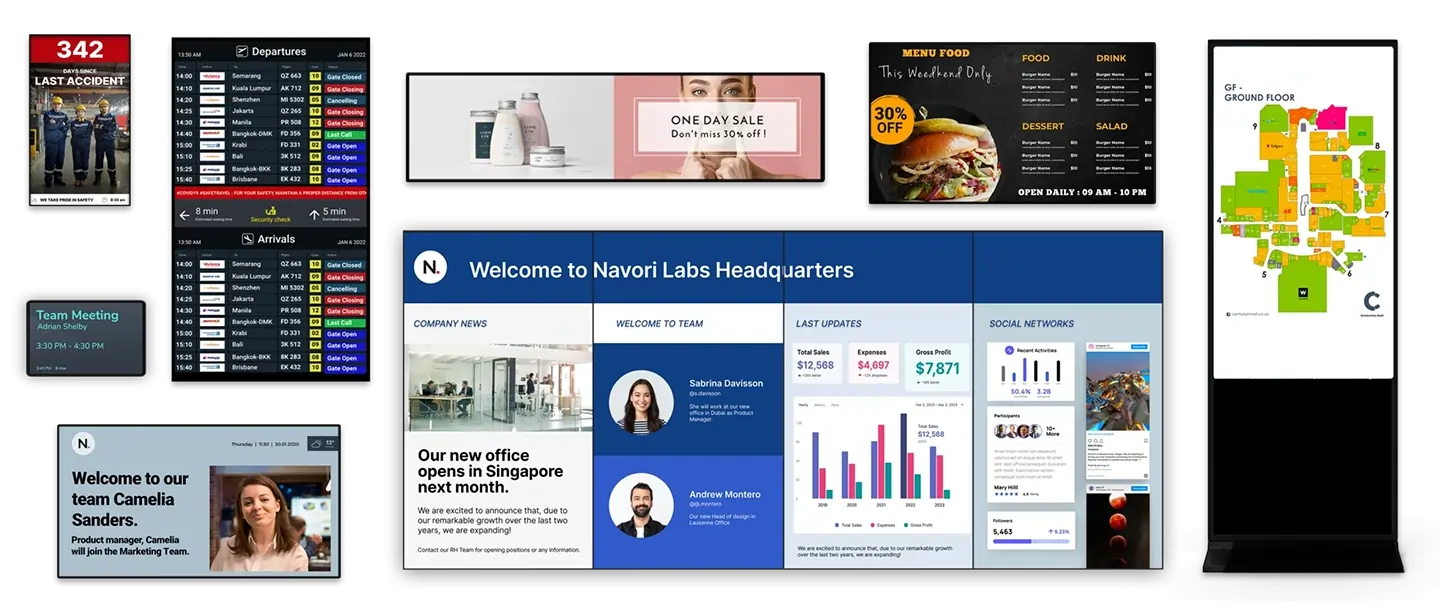
The Navori digital signage platform delivers reliable, high-quality content playback across commercial digital signage displays and standalone player devices.
COMMERCIAL SCREENS

STANDALONE PLAYER DEVICES
What is Digital Signage Software?
Digital signage software is the command center for creating and managing visual experiences across a network of screens. From videos and images to presentations and live data, the CMS lets teams update content remotely. Retailers can promote offers, companies can share internal news, and public organizations can publish timely announcements.
With software for digital signage, you can design visuals, schedule campaigns, target messages by audience or location, and measure engagement. The system turns everyday displays into coordinated communication channels that are easier to manage and more relevant to viewers. As an enterprise digital signage software solution, Navori supports cloud, on-premise, and hybrid deployments for organizations managing anything from a single display to global screen networks.
Unlock the Power of an Enterprise Digital Signage Platform
Digital signage goes beyond traditional communication by giving businesses a flexible way to deliver timely, engaging messages. The software and connected systems support rich visuals, adaptable scheduling, and clearer communication.The platform brings advertising, information, and audience engagement into one managed environment.
Content Management System (CMS)
At the heart of the digital signage software is a powerful content management system that gives you control over content across any number of screens. Launching a flash sale? Update every retail location at once, keep promotions consistent, and avoid delays and errors from manual changes. Role-based permissions, delegated administration, and centralized governance make it easy for multinational organizations to manage global branding while allowing regional teams to publish local content.
Scheduling Engines
The scheduling engine helps businesses automate when and where content appears. Campaigns can run by time of day, day of the week, specific dates, location, weather conditions, or audience type. A restaurant can switch automatically between breakfast, lunch, and dinner menus, while another business can adjust promotions based on local weather. The scheduling engine keeps each screen relevant without constant manual updates.
Data Integration
Digital signage software helps businesses deliver live, data-driven content through an open API and built-in connectors. Connect CRM, ERP, business intelligence (Power BI, Salesforce, SAP), social media (Linkedin, Facebook, Instagram, X), custom APIs, live data feeds, and other data sources to turn static displays into real-time information channels.
Audience Measurement
Navori is a leading digital signage company that enables businesses to deliver personalized experiences at scale. Navori’s AI-powered digital signage software solitions utilize advanced computer vision capabilities to gather and analyze data on visitor behaviors. These marketing analytics tools transform insights into action, automatically adjusting the content displayed on your screens to match the interests of the viewers present. This powerful ecosystem allows for context-aware content automation and comprehensive audience measurement.
Analytics and A/B Testing
Navori’s software for digital signage includes built-in analytics and A/B testing capabilities to help businesses optimize their digital signage campaigns. For example, big box stores can track real-time performance metrics such as viewer dwell time, and interaction rates to optimize content strategies and maximize ROI. As an innovator among digital signage providers, Navori, is at the forefront of digital signage software development, never letting clients fall behind in analytics and testing. Imagine putting different promotions up against each other and instantly seeing which resonates best with your target audience.
AI-Powered Signage Player Device
Audience analytics, player software, and digital signage players such as the StiX 3800 work together as one connected signage system. The compact player delivers high-performance playback and audience measurement while staying fully integrated with the platform. These tools support dynamic content changes based on viewer profiles. In a hotel lobby, screens can welcome guests and show relevant information about amenities or nearby attractions without requiring teams to manage every update by hand.
Efficiently Manage Your
Digital Signage
Benefit of Modern, Feature-Rich Content Management Software
Digital signage software provides professional tools for dynamic content creation, live data publishing, and centralized screen management. The CMS keeps everyday workflows straightforward, while enterprise-grade controls support complex organizations.Designed for organizations managing hundreds or thousands of screens across multiple regions, with enterprise security, approval workflows, and role-based administration.
Keep Content Fresh with Data Integrations
The signage platform connects with Microsoft 365, business intelligence tools, ERP and CRM systems, social media, and third-party live content providers through built-in connectors.
Track Footfall and Vehicles Surrounding Your Screens
Navori Digital Signage Software uses AI-enhanced analytics to track people and vehicle counts in any viewing area. You can generate foot and vehicular traffic counts with ease using digital signage software solutions, the Navori Player App measures audience exposure time by displayed content.
Next-Gen AI Signage Player
Our latest innovation offers a comprehensive end-to-end digital signage solutions, seamlessly integrating content management, screen monitoring, and AI-driven analytics.
- Powerful Performance native (4K@60fps)
- Power over Ethernet (PoE)
- AI-Enhanced Audience Analytics: Footfall & Dwell Time
- Screen Status Monitoring
- Hands-Free Setup
- Industrial Durability: MTBF 50k Hours
- Eco-Aware Viewer Detection
Access Navori Digital Signage Software Platform Across Industries!
Built for a Wide Range of Applications, Industries and Digital Signage Use Cases
Why Choose Navori for Digital Signage?
Global expertise, local services: With over 27 years of innovation in digital signage, Navori Labs is a trusted industry leader—delivering cutting-edge software solutions and personalized local services to professionals worldwide.
Discover the latest digital signage innovations tailored to your needs at our on-site or online innovation centers.
Create an account now and a Navori representative will get in touch within 24 business hours.
World-Class Software Engineering
Navori digital signage software is developed in-house for solution providers, resellers, and organizations, and supported through our subsidiaries.
Forward-Thinking Innovation
Our internal R&D department anticipates and meets the needs of Digital Signage users. Since its inception in 1998, Navori has been the leading force driving innovation within our industry.
Reliability, Security, and Performance
Navori’s SOC2 certification ensures security, trust, and transparency, mitigating risks associated with data breaches and ensuring digital signage software regulatory compliance.
Become a Certified Reseller and Lead in Your Market with Powerful Digital Signage Solutions!
Joining our network provides you with a single, professional digital signage software solution to address most use cases. Additionally, Navori is compatible with commonly used professional hardware, enabling you to offer an integrated solution to your clients.
As a reseller, you will receive local support from Navori, including pre-sales and technical assistance, product demonstrations, and maintenance.
FAQs About Digital Signage
What Are the Benefits of Digital Signage?
Digital signage has numerous advantages, especially when paired with the best digital signage software and compatible digital signage media player software. Key benefits are:
- Higher engagement from viewers compared to static visual displays such as billboards or posters.
- Better recall (up to 83% improvement compared to static displays).
- Reduced perceived wait times for customers or travelers in lineups.
- Instant content updates, including simultaneous updates across multiple screens when using cloud-based digital signage software.
- Scheduling and traffic capabilities for delivering content based on time of day, weather, season, and traffic patterns.
- Data collection functions to facilitate more targeted content.
A connected digital signage system can support information, advertising, and critical communications across an organization, with flexible controls for different locations, users, and audiences.
What Is Needed for Digital Signage?
For digital signage set-ups of any size, you need three things:
- Screen or display, either LCD or LED.
- Media player device that can run digital signage media player software. A separate media player is required for each screen.
- Digital signage CMS software which allows you to distribute and display content across screens. The best digital signage software makes it simple to scale up from a single screen to hundreds of displays in multiple locations.
What Is a Digital Signage Media Player?
A digital signage media player is a device that connects to your display and runs media player software to show your content on the screen, similar to a home TV streaming box or stick. The player ensures smooth playback of your content and supports high-resolution formats. Advanced models can also provide analytics, content automation, and screen monitoring.
What Are the Hardware Requirements for Digital Signage Player Software?
Digital signage media player software can run on a variety of devices or PCs, ranging in size:
- Compact media players/dongles like the Navori StiX 3800 are no bigger than a USB stick but are fully capable of handling sophisticated digital signage solutions.
- Standalone players such as BrightSign units or mini-PCs using operating systems such as Windows, Android, or Linux give you more flexibility.
- Commercial smart displays can run media player apps natively for large-scale all-in-one solutions.
Hardware requirements depend on your setting and your content. For standard signage, a simple dongle may be enough. For more advanced needs, such as multi-screen video walls or live data integrations, a higher-powered PC or enterprise-grade media player is recommended.
What Is a Digital Signage CMS and Why Do I Need It?
Digital signage CMS software allows you to create, schedule, and manage content across all your screens from one centralized platform. With a CMS, you can:
- Upload and manage multimedia content.
- Schedule content displays according to dayparting or other rules, or schedule-based targeting.
- Distribute content across multiple screens, specific screens, or groups of screens.
- Control permissions for different users.
Without a CMS, you would need to update each display screen individually. This could work if you only had a single screen, but it would quickly become unmanageable in a growing enterprise, especially with screens in multiple physical locations.
What Is the Difference Between Digital Signage Media Player Software And Digital Signage CMS Software?
Media player software and CMS software are different types of software for digital signage. Both are required for a complete digital signage software solution.
- CMS software is used to upload content such as video, live data feeds, and images.
- Digital signage media player software receives content and instructions from the CMS. It also supports advanced features like 4K video playback, live data-feed integration, and reporting back to the CMS.
What Is the Difference Between a Hosted Solution and a Server-Based Set-Up?
You can store your content and CMS locally or in the cloud.
- Cloud based digital signage software (also called digital signage cloud software) allows you to store your content and CMS on a cloud server. This makes it possible to log on from wherever you are, distribute updates to multiple screens in different locations, and take advantage of enterprise-level security without worrying about your in-house IT capabilities.
- A server-based set-up relies on your own internal storage. This requires in-house resources for security, scaling, and maintenance, but can be important for organizations with strict compliance requirements, such as health care and law enforcement.
Regardless of which storage option you choose, digital signage software solutions can be customized to meet your needs.
Can Digital Signage Software Be Used Across Multiple Locations?
Absolutely! In fact, this is one of the things that makes digital signage cloud software so powerful. You can manage content centrally, from one computer screen or even a mobile device, delivering content worldwide. Using digital signage CMS software, you can even customize your content by region, specific location, or audience demographics while keeping your branding and messaging consistent across the board.
With Software for Digital Signage, Who Can Access and Configure the Content?
Access is controlled through the digital signage CMS software. Role-based permissions can be assigned, or access can be assigned based on business units, locations, or other criteria.
How Do I Turn My TV into Digital Signage?
With the right software for digital signage, you can turn any standard screen into part of your digital display network. Here’s how:
- Attach a media player to your television. For example, the Navori StiX is an ultra-compact player perfect for tight spaces and portable set-ups.
- Install digital signage media player software on the media player.
- Connect the media player software to your CMS.
- Upload visuals onto your digital signage CMS software or design the visuals within the software.
- Display your content on your TV using the Internet.